Gameday Tesla wrap ideas: your team's colors, without the logo
A team-colors wrap is a palette problem, not a logo problem: two colors, a clean divider and one diagonal slash on the doors read as gameday from across the lot. How the red-and-gold wrap was built, palettes for six cities, why logos stay off, and free wraps for every Tesla.

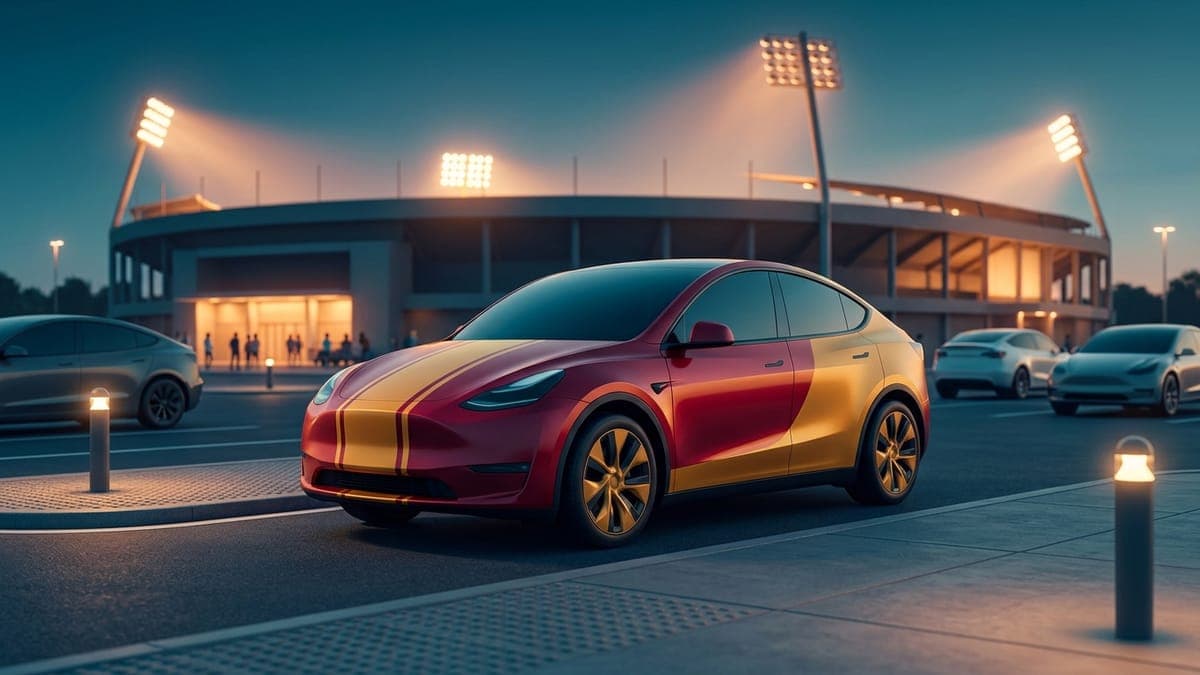
A gameday wrap on a Tesla needs exactly two things from your team: its colors. Not the logo, not the wordmark, not the number. Two colors split across the body with a clean divider, one diagonal slash on each door, and anyone in the parking lot knows who you came to see. The logo would only get in the way, and on a digital wrap it cannot be there anyway.
This guide shows the two-tone gameday livery, how the red-and-gold version in our gallery was built, the palettes for the cities people search for most, and why the logo-free version is the one to run. Every ready-made wrap here is a free Tesla Paint Shop file, and our tutorial shows how to upload a wrap from the Tesla app.
Why logos stay off
Team logos, wordmarks and numbers in a team's font are trademarks. A wrap that carries one is the team's property on your car, and a design that uses it cannot be shared in our community gallery, where every wrap is checked before it goes public. The AI generator declines logos and lettering outright, so if you type a team name into a prompt it paints the palette and leaves the badge out.
That turns out to be the better wrap. Logos on a car have to sit somewhere, and on a Tesla there is no grille, hood scoop or badge cluster to anchor them, so they float. Colors do not float. A two-tone split with a diagonal accent is what real race liveries use when the sponsor decals come off, and it looks like it belongs on the body.
The gameday livery, panel by panel
The recipe is a two-tone split with an accent. The upper body and hood carry the primary color. The lower panels carry the secondary, which is usually the metallic one. A thin white line divides them along the body crease. Then one bold diagonal slash of the secondary color cuts across each door, so the sides do not read as a plain stripe.
The prompt that built the red-and-gold collection below, word for word:
Two-tone gameday livery: bright red upper body and hood, metallic gold lower panels, one crisp white dividing stripe between them, a bold diagonal gold slash across each door, stadium-clean finish, no logos, no letters, no numbers.
Swap the two colors and you have a different city. The divider and the slash stay.
Ready-made: red and gold, every model
The red-and-gold version is built for Kansas City fans, and for anyone whose team wears the same pairing. Open a wrap, tap Download Wrap, then upload it in the Tesla app under Creations, then Wrap, then Upload.
- Model 3: original body, Highland base and Highland Performance
- Model Y: original, Juniper base, Juniper AWD, Juniper Premium, Juniper Performance and the Model Y L
- Cybertruck
- Model S: original and Plaid
- Model X
Palettes for the cities people search
Colors described plainly, so the prompt paints them without guessing. Use the primary on the upper body and the secondary on the lower panels, or flip them if the metallic reads better on top for your car.
| City | Primary (upper body) | Secondary (lower panels) | Divider |
|---|---|---|---|
| Kansas City | bright red | metallic gold | white |
| Buffalo | royal blue | bright red | white |
| Dallas | navy blue | metallic silver | white |
| Philadelphia | midnight green | metallic silver | black |
| Los Angeles | royal blue | sun-yellow gold | white |
| San Francisco | scarlet red | metallic gold | white |
| Green Bay | forest green | golden yellow | white |
| Baltimore | deep purple | black | metallic gold |
| Seattle | navy blue | bright lime green | grey |
| Denver | orange | navy blue | white |
Two tips on reading these. A metallic secondary looks richer on the screen than a flat one, because the car's renderer catches light on it. And dark primaries (navy, midnight green, purple) want a light divider, or the split disappears at night; the color guide has the contrast pairs that hold up.
Building yours in the studio
Open the studio, pick your model, and either generate it from the prompt above with your city's colors substituted, or build it by hand in three layers: a full-body fill in the primary, a rectangle in the secondary across the lower panels with a thin white line above it, and a rotated rectangle on each door for the slash. The colors and gradients tutorial covers picking exact hex values, which matters when a fan will tell you the gold is wrong.
If you would rather place the slash by clicking the door on the 3D car, the Garage does that, and rotates the shape to sit upright on the panel. Our tutorial on AI wrap prompts explains why describing "royal blue upper body" beats typing the team name, which the AI Tesla wrap generator converts into colors anyway.
Variations
- Vertical split. Primary on the front half, secondary on the rear, divided behind the front door. Reads as a race car more than a gameday car.
- Roof stripe. Add one wide stripe of the secondary color down the centre of the hood and roof. Good on the Model Y's big hood.
- Rival week. Load both teams' palettes as two wraps and swap on the drive over. The car holds ten from the app.
- A chime to match. A short crowd roar or a two-note fanfare from the lock sound library finishes it when you walk away from the car.
The practical part
A digital gameday wrap is free, takes a minute to swap, and comes off the day after the season ends. The vinyl version of a two-tone livery runs $2,500 to $5,000 installed and is on the car until you pay to remove it, which is a lot of commitment to a 9-and-8 season. The digital versus physical guide has the full comparison if you are weighing both.
Pick your model from the list above, or open the studio and paint the car in your colors before kickoff.
Frequently asked questions
Can I put my team's logo on a Tesla wrap? Not through FrunkLab. Team logos and wordmarks are trademarks, so the AI generator declines them and the community gallery does not accept designs that use them. A two-tone wrap in the team's colors is the version that works, and it looks better on the body anyway.
What colors are the red-and-gold gameday wrap? Bright red on the upper body and hood, metallic gold on the lower panels, a white divider between them, and a gold diagonal slash across each door. It matches Kansas City and San Francisco fans, and any other team in red and gold.
Does the wrap show up on the car during the game? It shows wherever the car draws itself: the touchscreen, the Tesla app, and the lock and charging screens. The physical paint does not change. That is why it is free to run for one Sunday and swap after.
How do I make one for a city that is not in the table? Use the prompt in the guide and replace the two colors with your team's, described plainly (for example "teal upper body, orange lower panels"). The generator keeps the design inside the car's outline and paints the palette without adding a logo.
Can I run a different wrap for away games? Yes. The car stores up to ten wraps loaded from the app and ten more from USB. Load both and pick either one under Toybox, then Paint Shop, then Wraps.
Put a custom wrap on your Tesla
Free community designs for every model, or make your own in the browser.