Tesla Model S wrap ideas: designs for a long, low sedan
The Model S has the longest hood and the longest side in Tesla's lineup, and a glass roof in between. Wrap ideas that suit it, from gold art deco to holiday scenes, how its two Paint Shop templates differ, and a free PNG for each look.
 By Sienna Park, Design editor8 min read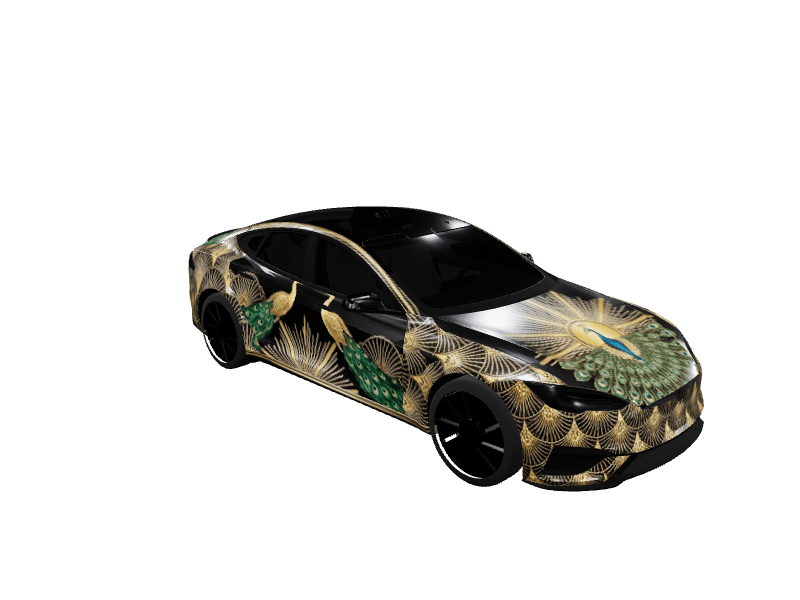
Quick answer: A Model S wrap works best along its long hood and longer sides, because the roof is glass. Gold art deco on black, color-shift chrome, side racing lines, camo and illustrated holiday scenes all suit it, and every idea below links a free Paint Shop PNG made on Tesla's own Model S templates.
The Model S is Tesla's long, low sedan. It has more hood than any other Tesla, a roof that is glass from the windshield to the rear window, and a liftback tail that slopes down to a short, wide rear. Next to a Model Y it looks stretched, and that length is the best thing a wrap has to work with.
This guide covers the ideas that suit a Model S, how Tesla's two Model S templates lay the car out, and a free Tesla Paint Shop file for each look, so you can see it on your own car's screen tonight.
What does the Model S's shape ask for?
Tesla's Model S template is a flat map of the car, front at the top, and four things stand out on it.
The hood is big. Right behind the front bumper sits the largest single painted shape on the template. It is wide and deep, so a centerpiece has room: a medallion, a big emblem-free graphic or the focal point of a scene.
The roof is glass. Behind the hood, the whole middle of the template is empty from the windshield back to the rear window. Two thin strips frame it, one on each side, running from the windshield pillar to the tail. Anything aimed at the top of the car lands on glass.
Each side is a long run of panels. Front to back, that is a front fender, a front door, a rear door and a rear quarter panel with the wheel arch cut out of its lower edge. A separate thin strip covers the sill below the doors. Together they make the longest painted side of any Tesla sedan.
The tail is a liftgate. The back of the car is a band below the rear window with two narrow arms beside the glass, then a small lip and the rear bumper. A stripe that reaches the tail finishes on that band.
Which wrap ideas suit a Model S?
Gold and black art deco
The Model S has always been the formal one in the lineup, and a luxury wrap leans into that. Art Deco Peacock sets fine gold fans and sunbursts on black lacquer, with emerald and sapphire peacocks across the doors and a gold deco medallion on the hood. It's the look for anyone searching for a gold Model S wrap, and it uses the long hood exactly the way it should be used. It comes for both templates, including the Model S (2021+) version.
The Model S luxury wraps page collects the rest of the dressed-up designs, from evergreen with gold to mirror chrome.
Chrome and color shift
Long, smooth doors give a reflective wrap plenty of surface to move across. Liquid Chrome is mirror-polished silver with a magenta-to-teal shift that changes as you rotate the car. Our chrome Tesla wrap guide explains why a color shift reads better on the car's screen than flat silver.
Racing lines that stay on the sides
A classic center stripe has the same problem on a Model S as on any glass-roofed Tesla: it shows on the hood, vanishes for the whole length of the roof, and comes back on the liftgate. The racing looks that work put the speed on the long sides instead.
Street Racer runs twin electric-blue lines over the hood and an orange pinstripe along silver sides. Blue Racing Stripe Tech, from a community designer, pairs deep blue with electric yellow stripes and sharp side accents, and Red Lightning Racing Graphic, by the same designer, throws white lightning bolts down glossy red doors. Our street racing wrap ideas cover stripe placement in more detail.
Camo
A pattern doesn't care where one panel ends and the next begins, which makes camo an easy fit for a car with four panels and a sill strip down each side. Autumn Camo mixes burnt orange, rust, olive and bark brown in a matte finish. Matte Tactical Camo Charcoal, a community design, goes darker with angular charcoal and olive shards.
Space and night scenes
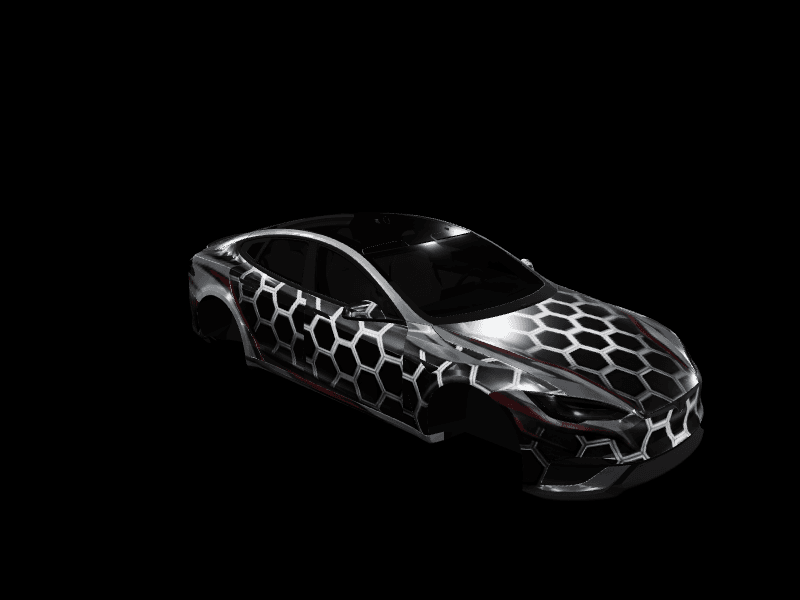
The long side is also a canvas. Cosmic Galaxy Space, from a community designer, covers the car in a purple and orange nebula, and Space Grid Fury goes the other way, with a black honeycomb grid picked out in chrome and red.
Halloween
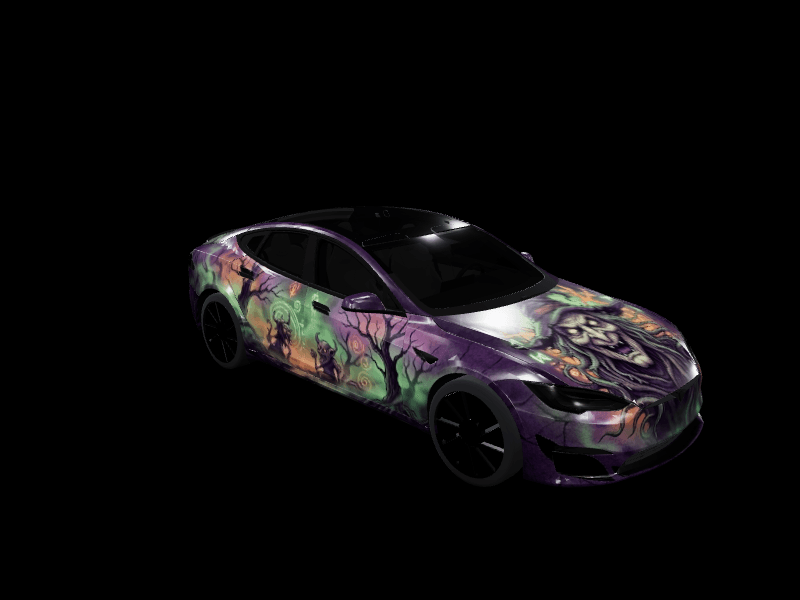
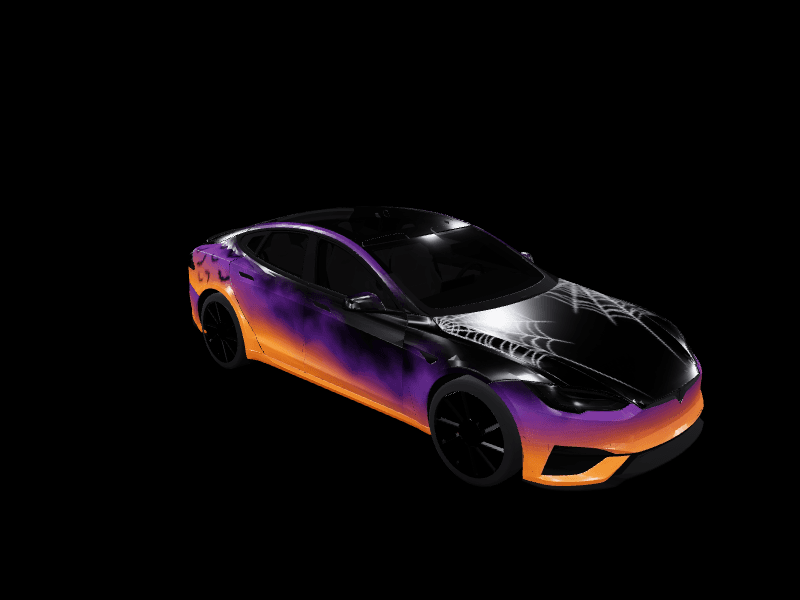
For October, Halloween Witch Scary Art, a community design and one of the most downloaded Model S wraps in our gallery, puts a witch and a haunted forest in purple and green across the car. Spooky Season is jack-o'-lantern orange and purple fog on black, with bats and spiderweb line art. The Tesla Halloween wrap ideas guide has more for the week ahead.
Christmas scenes
A long sedan is made for a scene that unrolls as you walk past it. Snowy Village Night lines both sides with snow-roofed cottages and glowing windows, with a decorated tree on the hood. Toy Workshop Parade marches wooden toy soldiers down a crimson car while a toy train hauls presents along the doors, under a giant gold bow on the hood.
For the classic looks, Candy Cane Christmas keeps the stripes wide and few, and Evergreen and Gold suits the formal shape of the car. The Model S Christmas wraps page gathers them all, and our Tesla Christmas wrap ideas cover every model.
For winter without the holiday, Winter, from a community designer, hangs silver icicles and snowflakes over a satin blue fade.
Every design made for the car lives on the Tesla Model S wraps page.
Which Model S template do you need?
Tesla publishes two Model S templates in its official wrap templates: Model S (2021+) and Model S (2025+) Plaid. Both are 1024x1024 PNGs, and they share the same hood, doors, glass outline and sill strips. They differ at the ends: the Plaid file's front bumper has two extra cut-outs at its upper corners, and its rear bumper is shaped differently.
That's why most Model S designs in our gallery come in two versions. Pick the file that matches your car, or the bumpers won't line up. Our Tesla wrap templates page shows both next to every other model, and the studio lays Tesla's outline over your design so you can see each edge as you work.
What doesn't work on a Model S?
- Roof art. The top of the car is glass. Put the graphic on the hood or the doors.
- A lone center stripe. It shows on the hood and the liftgate and nowhere in between. Let the sides carry the stripe, or pair a hood stripe with a side line.
- Big art on the rear wheel arch. The rear quarter panel is cut away around the wheel, so a face or figure placed low there loses its bottom half. Center large graphics on the doors.
- Lettering and logos. Text warps over the curves, and brand logos aren't allowed in our gallery. Palette and motif carry a theme without them.
How do you try a wrap on your Model S?
Real vinyl on a car this long is a big bill, and our breakdown of what a Tesla wrap costs has the numbers. A digital wrap costs nothing, so live with the design on the screen first.
- Pick a wrap above and tap Download Wrap.
- In the Tesla app, go to Creations > Wrap > Upload and choose the PNG. You'll need app 4.59.1 or newer and car software 2026.26 or newer.
- Rotate the 3D preview, then tap Upload & Apply Wrap.
- In the car, it's waiting in Toybox > Paint Shop > Wraps.
No app update yet? Copy the PNG into a folder named Wraps at the root of an exFAT or FAT32 USB drive and pick it in the same Paint Shop menu. Our tutorial on how to upload a wrap from the Tesla app covers both routes and the usual hiccups.
To make your own, design a Model S wrap in the studio and start from a color, a stripe or a prompt to the AI Tesla wrap generator. A free account includes 2 AI wraps a month, and one-time packs add more. Your first Tesla wrap walks through the whole process from blank template to exported PNG.
While the car is wearing something new, give it a sound to match: the lock sound library has nearly 400 free lock sounds. Copy LockChime.wav to the top level of a USB drive, then open Toybox > Boombox, turn on Lock Sound and choose USB.
Own a different Tesla too? The Model X wrap ideas, Model 3 wrap ideas, Model Y wrap ideas and Cybertruck wrap ideas cover the rest of the lineup.
Frequently asked questions
Can you wrap a Tesla Model S in Paint Shop? Yes. Model S got the full Paint Shop in Tesla's 2026 Spring Update, with the same Wraps tab as every other model, and the Summer Update added uploads from the Tesla app. Pick a wrap in Toybox, then Paint Shop, then Wraps, or send one from the Tesla app under Creations, then Wrap, then Upload.
Is there a Model S wrap template? Yes, two. Tesla publishes Model S (2021+) and Model S (2025+) Plaid, both 1024x1024 PNGs. They differ at the front and rear bumpers, so use the one that matches your car.
What wrap looks best on a Model S? Designs that use the long hood and the long sides: gold art deco on black, color-shift chrome, side racing lines, camo and illustrated scenes. The roof is glass, so graphics aimed at the top of the car don't show.
How do I put a wrap on my Model S? Download the PNG, then upload it in the Tesla app under Creations, then Wrap, then Upload, with app 4.59.1 or newer and car software 2026.26 or newer. You can also copy it into a folder named Wraps at the root of a USB drive and pick it in Toybox, then Paint Shop, then Wraps.
Find the look that suits your Model S, then open the studio and make it yours.
Put a custom wrap on your Model S
Community designs, free to download, or make your own in the browser.