Street racing Tesla wrap ideas: the movie-livery look, no decals needed
The silver-and-blue street-racing livery from the movies works on a Tesla because it is three decisions, not fifty. Which base color, where the two racing lines go, and what one accent stripe does for the rest of the car. Free downloads for every model, and how to build your own.

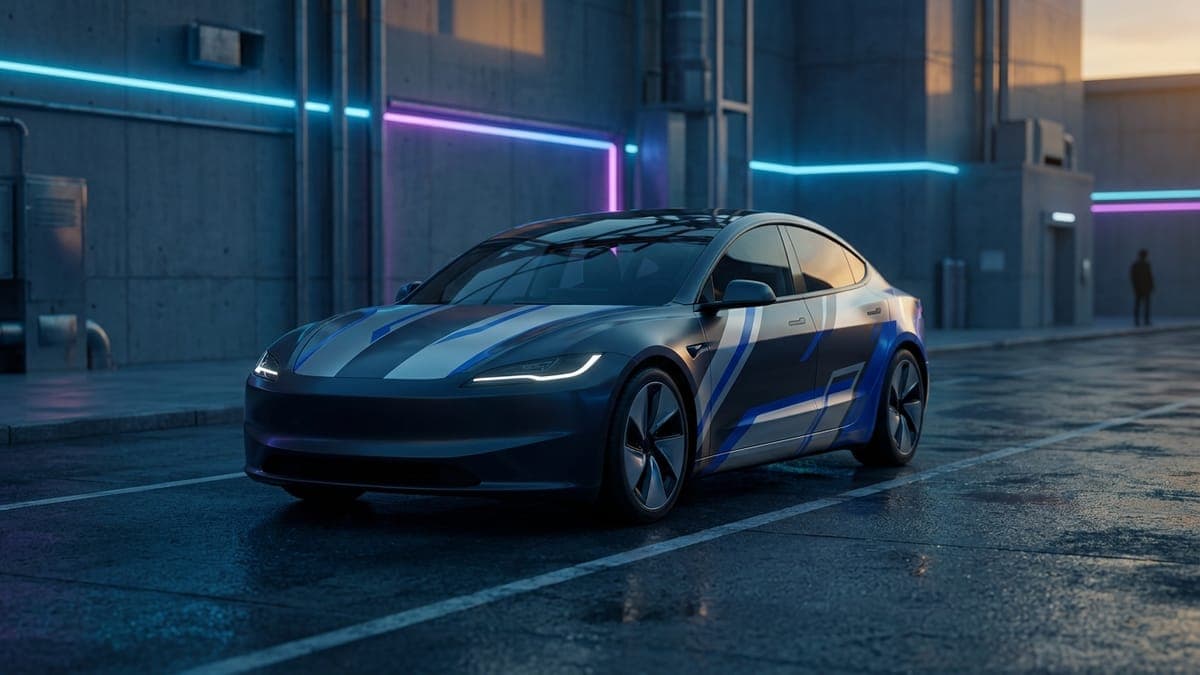
A street racing wrap on a Tesla comes down to three decisions: a metallic base, two racing lines that run the length of the car, and one thin accent stripe that ties the sides to the hood. Get those right and the car reads as the silver and blue coupe from the street-racing movies without a single decal, number plate or sponsor block. Get them wrong and it reads as a rental with tape on it.
This guide walks through the look, why it works on Tesla bodies in particular, and where the lines should go on each model. Every example is a free digital wrap for Tesla Paint Shop: download one and follow our steps to upload a wrap from the Tesla app, or open it in the studio and change it.
What makes the look
The livery people picture when they say "street racing" has a specific recipe. The base is silver or light grey with a metallic sheen, not white and not chrome. Two parallel racing lines in a saturated blue run from the nose, over the hood, across the roof and down the trunk. The lower body is darker, usually navy, so the car looks planted. And there is one thin line in a warm color, orange or gold, running along the shoulder where the door meets the window line.
That is it. The original cars had sponsor logos and a number, and those are the two things a digital wrap should leave out. The AI generator on FrunkLab will not paint logos or lettering, and the community gallery declines them, so the version that lives here is the clean one. It is also the better-looking one on a modern car, because a Tesla has no vents, scoops or badges to hang decals around.
Why it suits a Tesla
Racing lines are a length-of-car graphic. They work when the body has one uninterrupted sweep from hood to trunk, and every Tesla has exactly that: no hood scoop, no grille, a glass roof, and a tail that drops cleanly. The lines can run unbroken from the front bumper to the rear, which is the effect the design depends on.
The shoulder stripe does a second job on a Tesla. The doors are tall and plain, and a single horizontal line at window height breaks them up without adding pattern. On the Model 3 and Model Y it sits just below the glass. On the Cybertruck it follows the crease that already runs along the side, so the truck looks like it was drawn that way.
The ready-made collection
We generated the livery once per model so the lines land in the right place on each body. Each one is a finished Paint Shop file: open it, tap Download Wrap, and upload it in the Tesla app under Creations, then Wrap, then Upload.
- Model 3: original body, Highland base and Highland Performance
- Model Y: original, Juniper base, Juniper AWD, Juniper Premium, Juniper Performance and the Model Y L
- Cybertruck
- Model S: original and Plaid
- Model X
The racing collections for each model live at Model 3 racing wraps, Model Y racing wraps and Cybertruck racing wraps, alongside the other liveries owners have made.
Where the lines go, model by model
Model 3 and Model 3 Highland. Run the two blue lines about a hand's width apart, centred on the hood, straight over the glass roof and down the trunk lid. The Highland's smoother nose means the lines can start closer to the bumper edge. Keep the navy lower body below the door handles; higher and the car looks short.
Model Y and Model Y Juniper. The Y is taller, so the shoulder stripe earns its keep here. Place it at the bottom edge of the windows and let it run through the rear quarter to the tail light. The racing lines are the same as the Model 3, but widen them slightly, since the hood is bigger.
Cybertruck. The truck is all flat panels, so the lines stay perfectly straight and the crease along the side becomes the shoulder stripe for free. Run the blue lines over the hood, up the windshield-side of the roof and along the bed cover. The Cybertruck design tutorial covers the landscape template it uses.
Model S and Model X. The Model S has the longest hood in the lineup, so its racing lines can be a touch wider and further apart. The Model X hood is short, so keep its center stripes slim and let them carry on below the rear window. On the X, stop the shoulder stripe before the falcon door cut line so it does not look broken when the doors are drawn.
Building your own version
If you want a different base color or a different accent, start from any wrap above and open it in the studio. The lines and the stripe are separate layers, so you can recolor them without redrawing.
To generate one from scratch, describe the recipe rather than the reference. A prompt that works:
Matte silver metallic base across every panel, two bold electric-blue racing lines running from the hood over the roof to the trunk, dark navy lower side skirts, one thin bright-orange pinstripe along the shoulder line, no text, no decals.
Swap "electric-blue" for "candy red" or "lime green" and you have a different car. Swap "silver" for "gunmetal grey" and it turns into a night-race version. Our tutorial on AI wrap prompts has more on why naming colors beats naming movies, and the color guide lists blue and orange pairings that hold contrast on a screen.
Two things the AI Tesla wrap generator does on its own: it keeps the design inside the car's body outline, and it refuses logos and text. If you type a film or a team into the prompt it will translate the name into a palette rather than draw the badge, which is the right outcome for a wrap you might share.
A few variations that also work
- Twin white lines on black. The same geometry, inverted. Reads as a track car rather than a street car.
- Single wide centre band. One thick blue band instead of two thin lines, with the shoulder stripe kept. Works well on the Model Y's bigger hood.
- Gunmetal and gold. Dark grey base, gold lines, no navy lower body. Quieter, and it hides road grime on the screen as well as in real life.
- Add a lock chime. A short turbo spool or a two-note rev from the lock sound library matches the look when you walk away from the car.
The practical bit
A digital street racing wrap costs nothing and takes a minute to swap, which is the whole reason to try one. The physical version of this livery, silver base plus stripes plus a two-tone lower body, runs $3,000 to $5,000 installed and lives on the car for years. The digital one can come off before your next work trip. If you end up wanting the vinyl, our guide to Tesla wrap cost and the digital versus physical comparison cover what to expect.
Pick your model, grab the wrap above, or open the studio and draw your own two lines.
Frequently asked questions
Does the racing wrap have a car number or sponsor logos on it? No. Tesla's Paint Shop shows any image you load, but the AI generator will not paint lettering or logos, and the community gallery declines wraps that use someone else's brand. The livery here is the clean version: base color, two racing lines, one accent stripe.
Which Tesla does the street racing look suit best? The Model 3 and the Cybertruck. The Model 3's long unbroken roofline lets the lines run end to end, and the Cybertruck's flat panels keep them perfectly straight. It works on every model, though; the Model Y and Model S versions just use a slightly wider line.
Can I change the blue to another color? Yes. Open the wrap in the studio, select the line layer, and pick a new fill. Or generate a fresh one with the prompt above and a different color name. Red lines on silver and white lines on black are the two most common swaps.
How do I get it onto the car? Download the PNG from the wrap's page, then in the Tesla app go to Creations, then Wrap, then Upload. On the car it appears under Toybox, then Paint Shop, then Wraps. Cars on older software can load it from a USB drive instead.
Is a digital wrap the same as a real vinyl wrap? No. A digital wrap changes how the car looks on its own screens and in the app. It does not change the paint. That is also why it is free to try, and why you can run the racing look for a week and switch to something else.
Put a custom wrap on your Tesla
Free community designs for every model, or make your own in the browser.