Tesla Halloween wrap ideas: spooky Paint Shop designs you can swap back in November
A Halloween wrap is the best argument for digital wraps: jack-o-lantern orange, purple fog and bat silhouettes on the car's screen for four weeks, gone in a tap on November 1. The palette that reads as spooky, what to leave out, wraps for every Tesla, and prompts for your own.

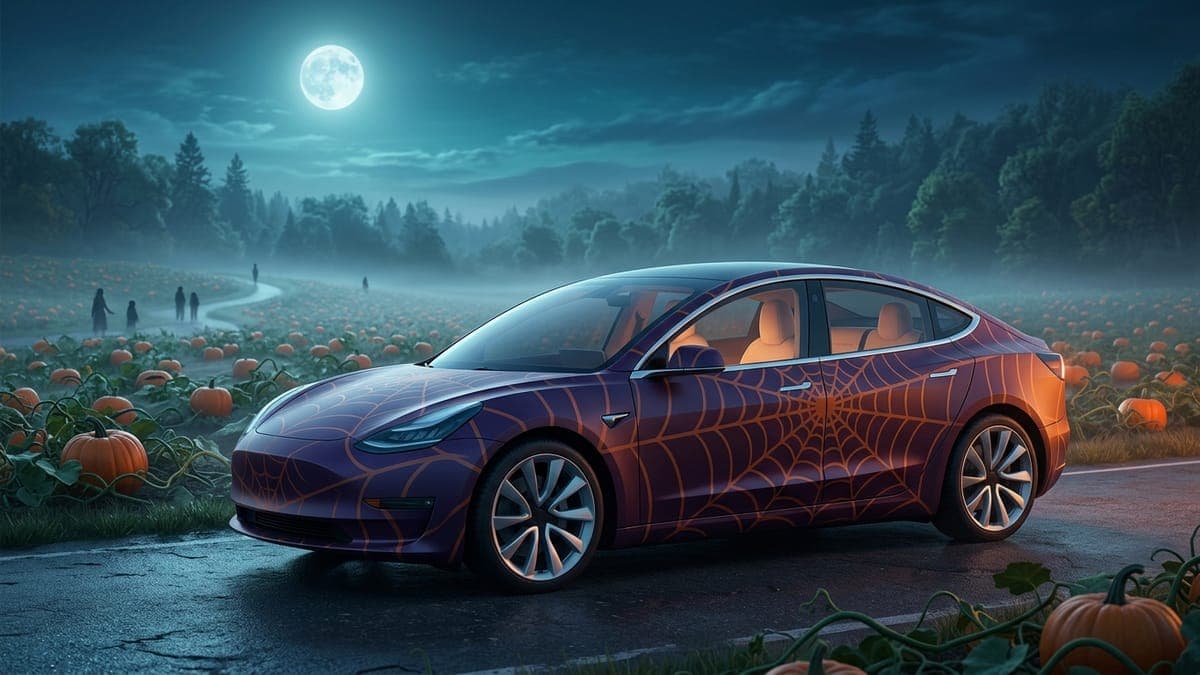
A Halloween wrap for a Tesla is a four-week design. It goes on the car's screen in early October, it gets a reaction from every passenger who sees the car draw itself in orange and purple, and it comes off on November 1 without leaving a mark. No other kind of wrap makes that much sense as a digital one, which is why the community gallery fills with spooky designs every autumn.
This guide covers what makes a Halloween wrap read as spooky rather than as an orange car, the palette and motifs that work at the size the car actually displays them, a ready-made wrap for every Tesla model, and prompts for making your own. Every design here is a free Tesla Paint Shop file you can load from the Tesla app or a USB drive, and swap for something else whenever you like.
Tesla's four built-in Halloween wraps
Tesla joined in this year. Software update 2026.38.3, rolling out since October 6, added Halloween Mode to Toybox and four Halloween wraps to Paint Shop. Not a Tesla App describes them as an orange pumpkin finish with carved faces, a stem on the hood, bats and cobwebs; a black base with white ghosts and bats; a candy-covered "Trick or Treat" design with jack-o'-lanterns; and a dark textured finish with red streaks.
They sit in Toybox > Paint Shop > Wraps, right next to the wraps you load yourself, so a custom Halloween design works exactly as before. Cars on the FSD software branch get Halloween Mode a little later, and our Halloween Mode news post has the rest of the update. Four is a fun start, but every car that installs it gets the same four. The rest of this guide is about making the one nobody else on your street has.
The palette does the work
Halloween is a three-color idea: pumpkin orange, a deep purple, and black. You can add a pale bone white for line work, and a sickly green if you want a witch's-brew note, but the three core colors carry it. The mistake is treating orange as the base. A car that is orange all over reads as a construction vehicle. A car that is black with orange lifting up from the rocker panels reads as a jack-o-lantern glowing from underneath.
So the base is black, or near-black. The orange lives low on the body, brightest at the bottom and fading upward. Purple sits between the two as a fog, drifting up the doors and the rear quarter. On a Tesla screen at night, that gradient from orange to purple to black does most of the mood on its own, and the color guide has the exact pairings that keep enough contrast when the car draws them small.
Motifs that survive the car's screen
The car shows the wrap on a model about the size of your hand, so fine detail disappears. Motifs that hold up:
- Bat silhouettes. Small, black, scattered across the rear quarter and doors in a loose flock. They read at any size because they are pure shape.
- Spiderweb line art. Thin white lines in the corners of the hood and the trunk. Corners only; a web across the whole hood looks like a crack.
- Fog. A soft purple gradient with no hard edges, rising from the bottom. This is texture, not a drawing, so it never looks wrong.
- A moon. One pale disc on the roof or the hood, behind the bats. Optional, and it gives the flock somewhere to be flying from.
- Big carved pumpkins. A jack-o-lantern works when it is large: one grinning pumpkin on the hood, or a parade of them down the doors. Size is what keeps the carved face readable.
- Skeletons and ghosts. White figures on a dark base are the highest-contrast Halloween shapes there are, which is why a line of dancing skeletons reads from across a parking lot on the app.
Motifs to skip: tiny faces and characters (a little face on a door just looks like a smudge at hand size), lettering of any kind, and anything red enough to read as blood, which the generator declines and which passengers will not thank you for.
The ready-made collection
We generated the same design once per model so the fog rises from the right panels on each body. Open any of these, tap Download Wrap, and upload it in the Tesla app under Creations, then Wrap, then Upload.
- Model 3: original body, Highland base and Highland Performance
- Model Y: original, Juniper base, Juniper AWD, Juniper Premium, Juniper Performance and the Model Y L
- Cybertruck
- Model S: original and Plaid
- Model X
This week we added three more illustrated looks for the Model Y and Model 3, each a full scene rather than a color scheme:
- Pumpkin Patch Parade, carved jack-o-lanterns tumbling down both sides on curling vines over midnight purple: Model Y Juniper Premium, Model Y 2020-2024, Model 3 Highland
- Skeleton Joyride, grinning skeletons dancing down the doors with candy corn and a witch-hat skull on the hood: Model Y Juniper Performance, Model 3 Highland Performance, Model 3 2017-2023
- Haunted Hollow Ghosts, friendly sheet ghosts drifting past a haunted house and glowing pumpkins under a full moon: Model Y Juniper, Model Y L, Model 3 Highland
The prompts behind all three are in our Halloween wrap prompts guide, and if you want a look that lasts past October 31, the fall wrap ideas guide trades the ghosts for falling leaves.
Browse the Model Y Halloween wraps and Model 3 Halloween wraps for the ones other owners have posted, and fork any of them into your own editor if you want to change the colors. Our writers dressed their own cars for October as well: neon pumpkins and hologram ghosts on a Model Y Juniper, campfire ghosts and skeleton mechanics on a 2020-2024 Model Y, and luna moths and stained glass on a Model 3 Highland.
How it lands on each model
Model 3 and Model Y. The orange sits below the door handles and the purple fog fills the doors. Bats go on the rear quarter panel, where the body is flattest, and one web in each front corner of the hood. On the Juniper's smoother tail the fog can wrap around the light bar.
Cybertruck. The truck is a gift for this. The flat sides take the gradient with no distortion, the bed cover becomes a night sky for the flock, and the angular body already looks like something out of a monster film. Keep the webs off the windshield edge, which the truck draws as one big triangle.
Model S and Model X. The long hood is the place for the moon-and-bats composition, since it is the biggest flat panel on either car. The fog works better on the X's high doors than the orange does, so push the orange lower on the X.
Making your own
Open the studio, pick your model, and either build it from layers (a black background, a gradient from the pattern library, a few bat stickers) or describe it to the AI Tesla wrap generator. The prompt that made the collection above:
Deep black base with a glowing jack-o-lantern orange lower body, a purple fog gradient rising from the rocker panels, a scattering of small bat silhouettes on the rear quarter panels and thin white spiderweb line art in the hood corners, eerie October night look, no faces, no text.
Variations that come out well: swap "purple fog" for "toxic green mist" for a witch's-brew car; drop the bats and add "one pale full moon on the roof" for something quieter; or replace the orange with "candle-flame yellow" for a softer glow. Our tutorial on AI wrap prompts explains why describing colors and placement beats naming a film, and the generator keeps everything inside the car's body outline on its own.
If you design in the Garage instead, the Garage tutorial shows how to place stickers straight onto the 3D car, which is the fastest way to scatter a flock of bats exactly where you want them.
Finish it with a lock chime
A Halloween wrap with the stock lock sound is a missed opportunity. The lock sound library has a slow Zombie Moan, a one-second Monster Death Roar and a Scary Whoosh that sounds like something just swept past the car, and our Halloween lock sounds roundup has more. The AI chime generator will make a two-second "a low creaking door with a distant thunder rumble" from a sentence, and update 2026.38.3 adds Tesla's own Halloween lock sound to the Lock Sound menu. For a custom one, copy LockChime.wav to the top level of a USB drive, plug it into a front data port, then open Toybox > Boombox, turn on Lock Sound and choose USB. The chime and the wrap are separate, so you can keep either one past October.
Swapping it back
The car holds up to ten wraps loaded through the app and ten more from USB, so the Halloween wrap does not have to replace anything. Load it alongside whatever you run the rest of the year, pick it in Toybox, then Paint Shop, then Wraps for October, and pick the other one back in November. Nothing to peel, nothing to pay, and our tutorial shows how to upload a wrap from the Tesla app if you have not done it before.
Grab the wrap for your model above, or open the studio and start with a black car and a bucket of orange.
Frequently asked questions
Can a Tesla show a Halloween wrap? Yes. Any Tesla with Paint Shop, which is every current Model 3, Model Y, Cybertruck, Model S and Model X, shows a custom PNG wrap on its screens and in the app. You upload the file from the Tesla app or a USB drive and pick it under Toybox, then Paint Shop, then Wraps.
Does Tesla have its own Halloween wraps? Yes. Software update 2026.38.3 added four Halloween wraps to Paint Shop as part of Halloween Mode: a pumpkin, a ghost and bat design, a candy-covered Trick or Treat design and a dark finish with red streaks. They sit next to your own wraps in Toybox, then Paint Shop, then Wraps, and cars on the FSD software branch get them a little later.
Does the wrap change the car's actual paint? No. A digital wrap changes how the car looks on its own screens. The paint stays as it was. That is what makes a four-week Halloween design practical: there is nothing to remove afterwards.
Can I put a pumpkin face or a horror character on it? Faces from films and games are declined by the AI generator, because they belong to someone else. Original motifs are fine: bats, webs, fog, a moon, carved jack-o-lanterns, skeletons and sheet ghosts. In practice the silhouettes read better at the size the car displays anyway.
How do I take the Halloween wrap off in November? Open Toybox, then Paint Shop, then Wraps on the car's screen and pick a different wrap, or none. The Halloween file stays loaded until you delete it, so it is ready for next year.
Can I use the same wrap on a different Tesla model? Each model uses its own template, so a wrap made for a Model Y will not line up on a Cybertruck. The collection above has a version for every model, and the studio lets you rebuild any design on a different template in a few minutes.
Put a custom wrap on your Tesla
Free community designs for every model, or make your own in the browser.